 MacBreak
The 20-20-20 rule on a Mac, without having to remember it
Every 20 minutes, look at something 20 feet away for 20 seconds. It's the simplest habit against digital eye strain — and the first one you forget once you're focused.
What is the 20-20-20 rule?
The 20-20-20 rule is a break routine the American Academy of Ophthalmology recommends for anyone who spends long stretches at a screen: every 20 minutes, look at an object at least 20 feet (about 6 metres) away, for at least 20 seconds.
It works on two things screens do to your eyes. Reading up close keeps the muscles that focus your eyes working without a pause, and people tend to blink less while staring at a screen, so the eyes dry out. Looking into the distance lets those muscles relax, and the pause is a natural moment to blink. Tired or dry eyes, blurred vision and headaches after a long session are the usual signs of digital eye strain.
Why the rule is so hard to keep
It isn't a willpower problem; it's an attention one. The moments you most need a break are the moments you're most absorbed, which is exactly when you stop noticing time. A phone timer gets silenced. A notification gets dismissed before you've read it. Any reminder you can click away quietly trains you to click it away.
So the reminder has to do the remembering and the stopping for you.
How to follow the 20-20-20 rule automatically on a Mac
MacBreak is a free, open-source menu bar app that takes the screen when it's time to rest and gives it back when you have. To set it up for the rule exactly:
- Install it with Homebrew:
brew install --cask deepakk33/tap/macbreak - Open Preferences: press Cmd-Space and type macbreak.
- Set "Look away every" to 20 minutes and "Look away for" to 20 seconds. The defaults are a gentler 30 and 30.
- Tick "Start at login" and save. That's the last time you have to think about it.
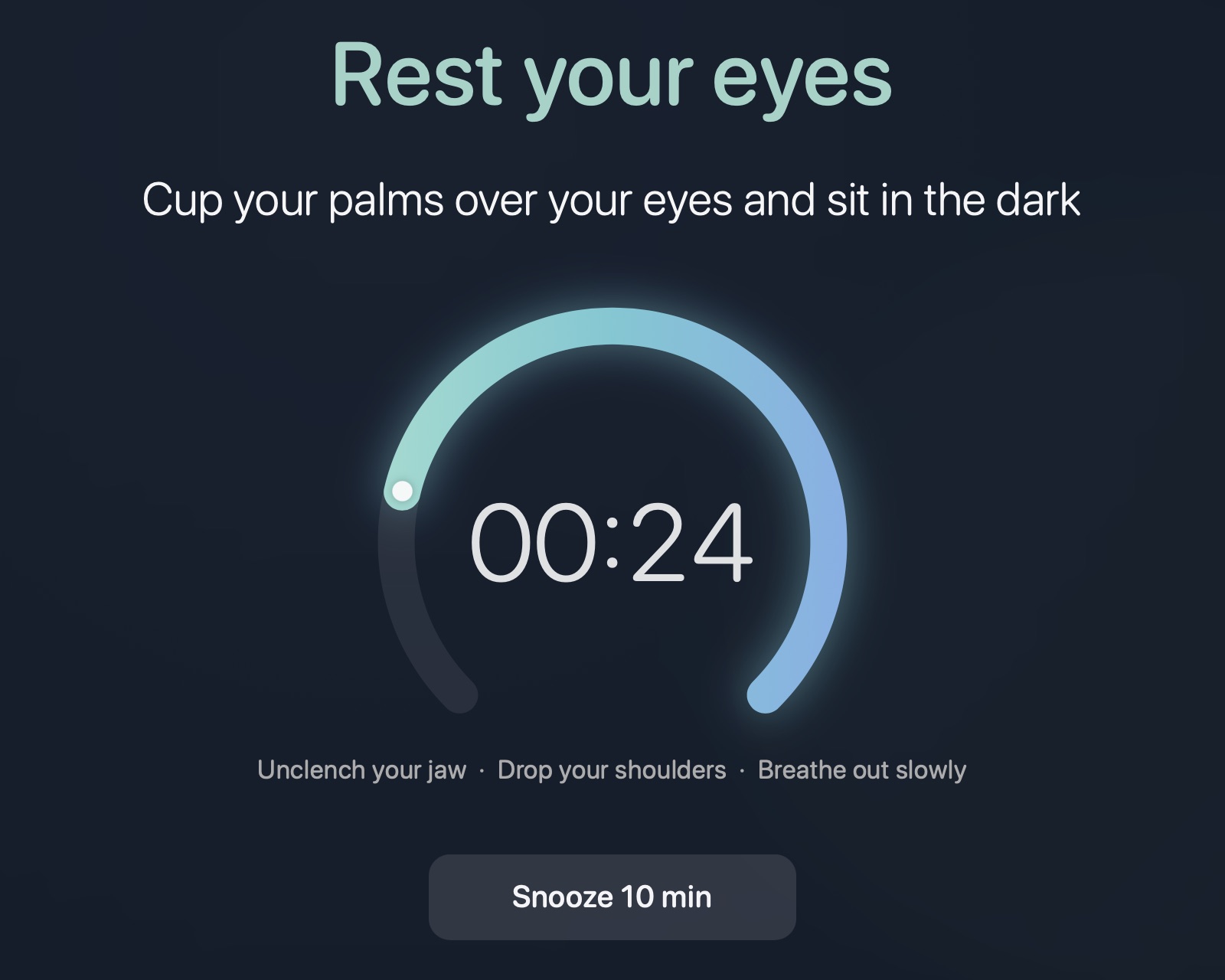
When a break comes due, MacBreak covers every display with a calm, blurred overlay and a dial that drains over the 20 seconds. There is no Done button to reach for: when the time is up, the overlay fades and your screen comes back on its own. If you genuinely can't stop — a call, a deploy — Snooze is one click away.
What to do during the 20 seconds
- Look out of a window at the furthest thing you can see, and hold it.
- Look far, then near, then far again, a few times.
- Close your eyes, or cup your palms over them and sit in the dark.
- Blink slowly and fully a few times.
MacBreak rotates through ten prompts like these at random, so the overlay doesn't turn into wallpaper you stop reading.
Your eyes aren't the only thing that needs a break
Twenty seconds of looking away does nothing for your back, wrists or legs. MacBreak also schedules a longer movement break — a 10-minute walk every 2 hours by default — and finishing a walk counts as an eye break too. Locking your screen for five minutes or more, say for lunch, counts as rest and restarts both clocks.
Other habits that help
- Keep the screen about an arm's length away, slightly below eye level.
- Cut glare: match screen brightness to the room and avoid a bright window directly behind the display.
- Make text bigger rather than leaning in.
MacBreak is a reminder, not medical advice. If eye strain, headaches or blurred vision persist, see an optometrist or ophthalmologist.
Let your Mac remember the 20-20-20 rule for you
Free, open source, native Swift. macOS 13+ on Apple Silicon and Intel. No account, no telemetry.
brew install --cask deepakk33/tap/macbreak
Questions
Is it 20 feet or 20 metres?
The rule says 20 feet, about 6 metres. What matters is distance: anything far enough away that your eyes stop working to focus. MacBreak's prompts say 20 metres; further is only better.
Does the 20-20-20 rule actually help?
Eye doctors widely recommend it as an easy way to relieve the symptoms of digital eye strain. It is not a treatment for underlying vision problems, so symptoms that persist deserve an eye exam.
Can I make the breaks longer or less frequent?
Yes. MacBreak has seven settings: how often each break comes, how long each lasts, the snooze length, how long a screen lock counts as rest, and when the menu bar starts counting down.
Is there a 20-20-20 timer built into macOS?
Not as such. Screen Time can limit how long you use apps, but it doesn't stop you on a schedule to rest your eyes. That gap is what MacBreak fills.
Is MacBreak free?
Yes. It is free and open source under the MIT licence, with no paid tier, no account and no ads.